Disputes Reference Guide
Including the following reference guide for your convenience.
Disputes Overview
What is a Dispute?
- Cardholder questions a transaction on their account
- Common Reasons for a Dispute:
- Credit not received
- Transaction paid for by other means
- Difference in amount
- Duplicate charges
- Billed for a canceled hotel stay or airline cancellation
- Situational awareness – Cardholders should review their statements every month
- Cardholders MUST notify Citi of disputes within 90 days from the transaction date
- Cardholders should retain all receipts and other transaction documentation
What’s the Process?
- Contact the Merchant and allow them to correct the situation
- Use CitiManager® to initiate and track a dispute online if the Merchant is unable to resolve
What happens when you initiate a dispute?
- Cardholder completes the CitiManager® online dispute form
- Remember to initiate your dispute within 90 days from the transaction date
- Disputes within 60 days from the transaction date can be submitted in CitiManager.
- Disputes between 61 days and 90 days from the transaction date will not have the option to dispute and will get a notification to call to speak to an Agent.
- Remember to initiate your dispute within 90 days from the transaction date
- CitiManager® flags the transaction(s) as being in dispute
- Cardholder may be contacted to provide additional information
- Provide documentation
- Include any documented (verbal or written) correspondence with merchant
- Timely customer follow-up is critical (even while traveling) to maintain chargeback rights
- Dispute Settlement Options 1
- Dispute resolved in the cardholder’s favor – the transaction is deemed invalid and the provisional credit is permanent
- Dispute resolved in the merchant’s favor – the transaction is deemed valid and the provisional credit is removed from the account. Cardholder is responsible for complying with the payment terms of the account.
How to initiate a dispute online
- Log in to CitiManager® and navigate to the Statement or Unbilled Transaction screen.
- Click on the three blue dots to blow up the transaction and click the blue Dispute button.
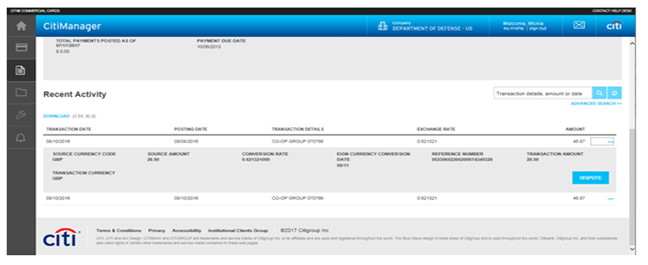
The information in the above screenshot is for illustrative purposes only
- On the Transaction Dispute screen, select the dispute reason from the Dispute Reason drop-down list.
- Note: Based on this selection you may be asked additional questions, or to download and send in a signed form.
- Complete applicable dispute criteria.
- Click the Continue button.
- On the Review screen, review the information provided to ensure accuracy and then click the Submit button.
- A confirmation screen displays.
APC Best Practices
- A call to the merchant solves most disputes
- CitiManager® is the fastest way to file and track a dispute
- Ensure accuracy in selecting the dispute reason and information given
- May not dispute if previously disputed
- Cannot cancel a dispute once Citi initiates with Associations (Visa, Mastercard).
- Keep records of everything and watch for instances where Citi® needs more information
- A conditional credit does NOT mean the dispute has been resolved in favor of the cardholder
- Even settled credits could be reversed if a merchant re-bills with proof of a valid charge or if the Associations rule in the Merchant’s favor
- Remember to initiate your dispute within 90 days from the transaction date
- Disputes within 60 days from the transaction date can be submitted in CitiManager
- Disputes within 61 days and 90 days from the transaction date will not have the option to dispute and will get a notification to call to speak to an Agent.